Generic Runtime Error (unknown error with no description or clue of what just happened):
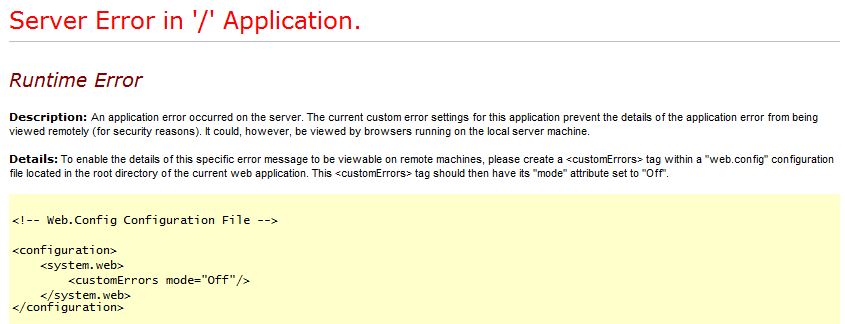
Add the following custom errors element to web.config (inside system.web):
< customErrors mode="Off"/ >
Now more information will be displayed:
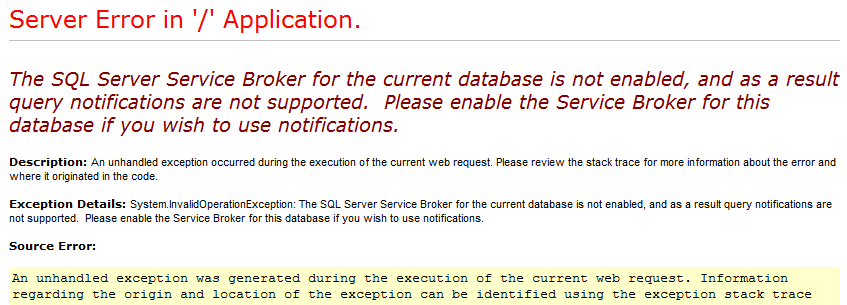
Generic Runtime Error (unknown error with no description or clue of what just happened):
Add the following custom errors element to web.config (inside system.web):
< customErrors mode="Off"/ >
Now more information will be displayed:
To remove the last commit from the master branch at Github but "saving" that last commit to a branch named mein-bak
[master]> git checkout -b mein-bak
[mein-bak]> git push origin mein-bak
[mein-bak]> git checkout master
[master]> git reset --hard HEAD~1
[master]> git push --force origin master
Before applying changes this is how master looks at Github:
a-b-c-d-e-f-g [master]
And this is how it looks after applying those changes:
a-b-c-d-e-f [master]
           \
            g [mein-bak]
Open a command prompt console and execute the following:
C:\Users\jdoe>runas /user:loremipsum\jsmith notepad
Where loremipsum is the machine's name (or the domain name) and notepad the program you want to execute as jsmith.
The command prompt will ask for jsmith's password and if entered correctly (and if such user has sufficient permissions) the program will be executed/open.
Create a script like the following and save it as send_email.ps1.
$from = New-Object System.Net.Mail.MailAddress "from@domain.com"

$to = New-Object System.Net.Mail.MailAddress "jdoe@gmail.com"

$messge = new-object system.Net.Mail.MailMessage $from, $to

$messge.IsBodyHTML = $true
$messge.Subject = "Test email to jdoe"
$messge.body = "Lorem ipsum dolor sit amet. Regards."

$smtpServer = 'localhost'
$port = '25'

$smtp = new-object Net.Mail.SmtpClient($smtpServer, $port)

$smtp.Send($messge);
Open PowerShell, go to the directory where the script was saved and execute it.

If you have permissions to execute scripts in Powershell, and the SMTP server is correctly configured, and the recipient email account exists, then you should get the email.
DECLARE @Table TABLE(
        SPID INT,
        Status VARCHAR(MAX),
        LOGIN VARCHAR(MAX),
        HostName VARCHAR(MAX),
        BlkBy VARCHAR(MAX),
        DBName VARCHAR(MAX),
        Command VARCHAR(MAX),
        CPUTime INT,
        DiskIO INT,
        LastBatch VARCHAR(MAX),
        ProgramName VARCHAR(MAX),
        SPID_1 INT,
        REQUESTID INT
)

INSERT INTO @Table EXEC sp_who2

SELECT  *
FROM    @Table
WHERE ....
CREATE PROCEDURE [dbo].[sp_who3]

AS
BEGIN

SET TRANSACTION ISOLATION LEVEL READ UNCOMMITTED

SELECT
    SPID                = er.session_id
    ,BlkBy              = er.blocking_session_id
    ,ElapsedMS          = er.total_elapsed_time
    ,CPU                = er.cpu_time
    ,IOReads            = er.logical_reads + er.reads
    ,IOWrites           = er.writes
    ,Executions         = ec.execution_count
    ,CommandType        = er.command
    ,ObjectName         = OBJECT_SCHEMA_NAME(qt.objectid,dbid) + '.' + OBJECT_NAME(qt.objectid, qt.dbid)
    ,SQLStatement       =
        SUBSTRING
        (
            qt.text,
            er.statement_start_offset/2,
            (CASE WHEN er.statement_end_offset = -1
                THEN LEN(CONVERT(nvarchar(MAX), qt.text)) * 2
                ELSE er.statement_end_offset
                END - er.statement_start_offset)/2
        )
    ,STATUS             = ses.STATUS
    ,[Login]            = ses.login_name
    ,Host               = ses.host_name
    ,DBName             = DB_Name(er.database_id)
    ,LastWaitType       = er.last_wait_type
    ,StartTime          = er.start_time
    ,Protocol           = con.net_transport
    ,transaction_isolation =
        CASE ses.transaction_isolation_level
            WHEN 0 THEN 'Unspecified'
            WHEN 1 THEN 'Read Uncommitted'
            WHEN 2 THEN 'Read Committed'
            WHEN 3 THEN 'Repeatable'
            WHEN 4 THEN 'Serializable'
            WHEN 5 THEN 'Snapshot'
        END
    ,ConnectionWrites   = con.num_writes
    ,ConnectionReads    = con.num_reads
    ,ClientAddress      = con.client_net_address
    ,Authentication     = con.auth_scheme
FROM sys.dm_exec_requests er
LEFT JOIN sys.dm_exec_sessions ses
ON ses.session_id = er.session_id
LEFT JOIN sys.dm_exec_connections con
ON con.session_id = ses.session_id
CROSS APPLY sys.dm_exec_sql_text(er.sql_handle) AS qt
OUTER APPLY
(
    SELECT execution_count = MAX(cp.usecounts)
    FROM sys.dm_exec_cached_plans cp
    WHERE cp.plan_handle = er.plan_handle
) ec
ORDER BY
    er.blocking_session_id DESC,
    er.logical_reads + er.reads DESC,
    er.session_id

END
An error occurred in the Microsoft .NET Framework while trying to load assembly id 65536. The server may be running out of resources, or the assembly may not be trusted with PERMISSION_SET = EXTERNAL_ACCESS or UNSAFE. Run the query again, or check documentation to see how to solve the assembly trust issuesPossible solution:
sp_configure 'clr enabled', 1
GO
RECONFIGURE
GO

ALTER DATABASE database_name SET TRUSTWORTHY ON

USE database_name
GO

EXEC sp_changedbowner 'sa'
using System;
using System.Data;
using Microsoft.SqlServer.Server;
using System.Data.SqlTypes;

public class TimeZoneHelper
{
    [Microsoft.SqlServer.Server.SqlFunction]
    public static DateTime MountainToUtc(DateTime mountainDateTime)
    {
         TimeZoneInfo zone = TimeZoneInfo.FindSystemTimeZoneById("Mountain Standard Time"); // "Mountain Standard Time" it's the ID regardless of daylight saving time (i.e. no matters if right now is daylight saving time, the ID name remains the same)

         DateTime utcTime = TimeZoneInfo.ConvertTimeToUtc(mountainDateTime, zone); // it automatically takes care of daylight saving time

         return utcTime;
    }

    [Microsoft.SqlServer.Server.SqlFunction]
    public static DateTime PacificToUtc(DateTime pacificDateTime)
    {
         TimeZoneInfo zone = TimeZoneInfo.FindSystemTimeZoneById("Pacific Standard Time"); // "Pacific Standard Time" it's the ID regardless of daylight saving time (i.e. no matters if right now is daylight saving time, the ID name remains the same)

         DateTime utcTime = TimeZoneInfo.ConvertTimeToUtc(pacificDateTime, zone); // it automatically takes care of daylight saving time

         return utcTime;
    }
}
Save the file as TimeZoneHelper.cs
csc /target:library C:\Users\jon.connor\Downloads\TimeZoneHelper.csThis will create a TimeZoneHelper.dll in the same directory where the source file is in.
sp_configure 'clr enabled', 1
GO
RECONFIGURE
GO

ALTER DATABASE Northwind SET TRUSTWORTHY ON;
GO
You also have to grant permissions to a SQL Server login:
GRANT UNSAFE ASSEMBLY TO some_user;
GO
Now you can create the assembly in the Northwind database
CREATE ASSEMBLY TimeZoneHelperAssembly
FROM 'C:\Users\jon.connor\Downloads\TimeZoneHelper.dll'
WITH PERMISSION_SET = UNSAFE
GO
Finally create functions based on the assembly methods.
CREATE FUNCTION dbo.MountainToUTC(@mountainDateTime datetime)
RETURNS datetime
AS EXTERNAL NAME
[TimeZoneHelperAssembly].[TimeZoneHelper].[MountainToUtc]
GO

CREATE FUNCTION dbo.PacificToUTC(@pacificDateTime datetime)
RETURNS datetime
AS EXTERNAL NAME
[TimeZoneHelperAssembly].[TimeZoneHelper].[PacificToUtc]
GO
And now you can start using these functions as you would normally do:
select dbo.MountainToUTC('2012-04-13 16:00:00'),
       dbo.PacificToUTC('2012-04-13 16:00:00')
Thanks to http://goo.gl/W4u42
